🚀 Experience the new and improved APIVoid! Check out what's new
BROWSER EXTENSION
APIVoid Script Stop blocks third-party scripts on every page you visit until you decide otherwise. See exactly which scripts each website tries to load, allow trusted sources, and block everything else, all from a single popup.
Granular Script Control
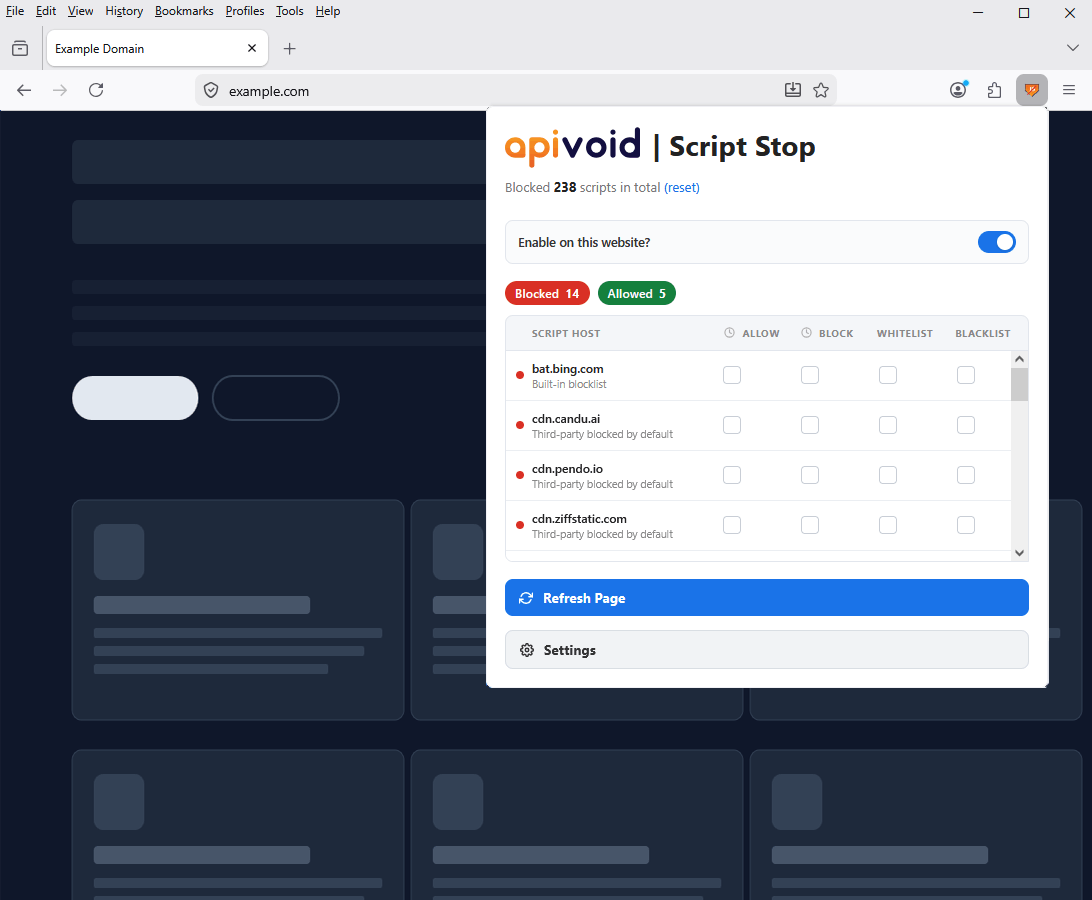
Modern websites load dozens of third-party scripts from analytics providers, ad networks, widgets, chatbots, and other external domains. APIVoid Script Stop blocks them all by default and lets you allow only the sources you trust, one host at a time, with no guesswork.
Any script served from a domain different than the website you're visiting is blocked automatically before it reaches the browser.
The popup lists every script host the current page tried to load, with a red or green dot showing whether it was blocked or allowed, and why.
Four checkboxes per row: Allow once and Block once for the current session, Whitelist and Blacklist for permanent decisions. Changes apply immediately.
Disable the extension for specific websites with one click. Ideal for banking, payment, and other sensitive sites that may break when third-party scripts are blocked.
Custom Lists and History
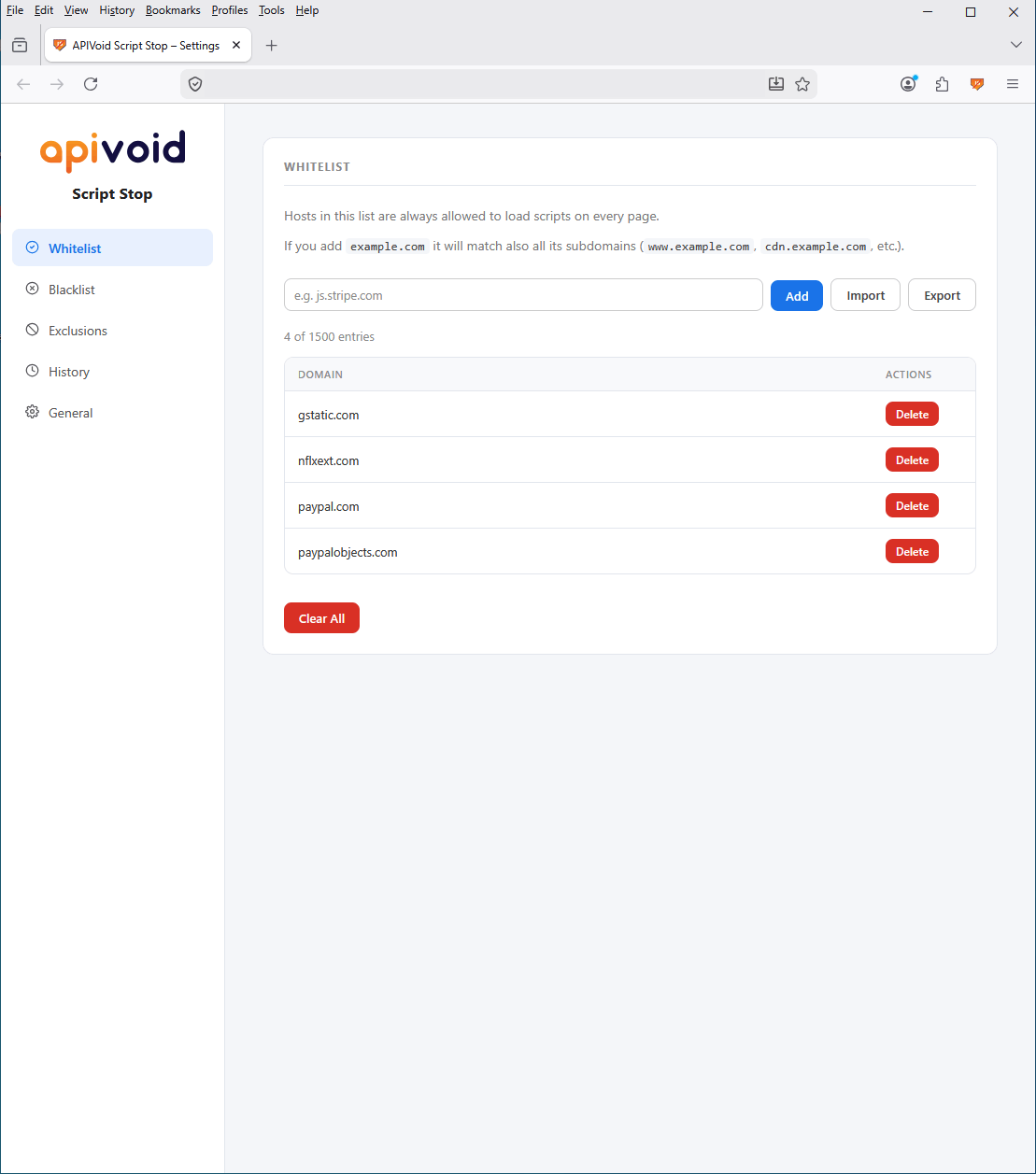
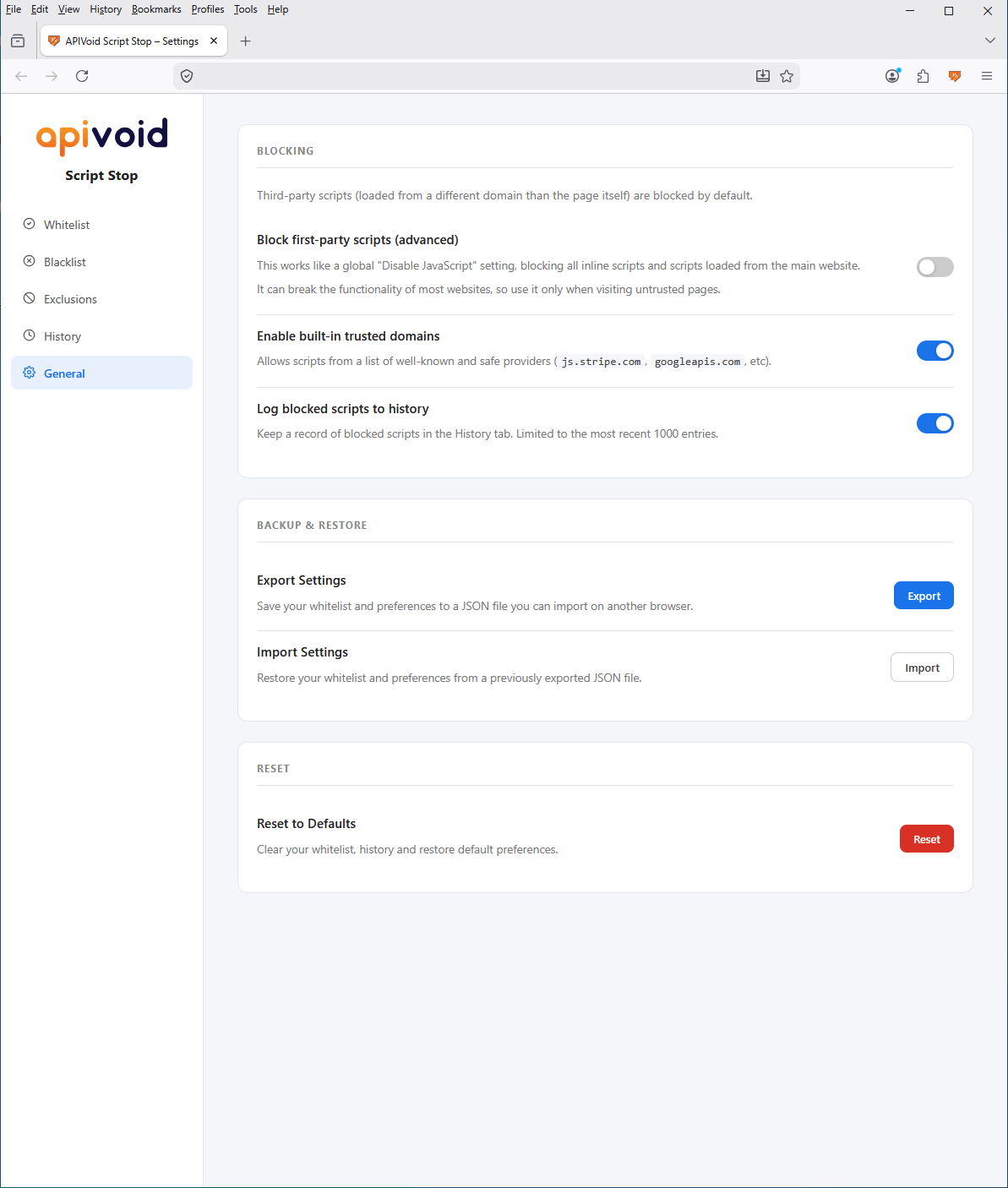
The settings page gives you full control over your allow and block lists, a curated list of trusted providers, and per-site exclusions. Search history of every blocked script across the websites you visit.
Permanently allow up to 1500 hosts or block up to 500. Subdomain-inclusive matching: whitelisting example.com covers automatically every subdomain of it.
A curated list of well-known and safe providers (Stripe, PayPal, Google APIs, and many more) is allowed out of the box, so common websites work without setup.
Every blocked script across every page is logged (up to 1000 entries), with timestamp and URL. Search the history, copy the entries, or one-click whitelist or blacklist any host.
Easily export your whitelist, blacklist, exclusions, and settings to a JSON file, and import them back on another browser or after reinstalling, with just a single click.
COMMON QUESTIONS
Find clear answers about how APIVoid Script Stop blocks scripts, what gets allowed by default and how to handle website breakage.
By default, APIVoid Script Stop blocks every JavaScript file loaded from a domain different from the website you're visiting. So if you visit example.com and the page tries to load a script from tracker.io, that script is blocked before it reaches the browser. First-party scripts (those served from the same domain as the website) are allowed by default, but you can also block those with one toggle in the settings.
Open the popup on the broken page. You'll see every script the page tried to load, with the blocked ones marked in red. Click the Allow once checkbox next to a script host to allow it for the current session, or check Whitelist to allow it permanently. If you can't easily identify which script is breaking the website, you can toggle off the per-site switch to disable Script Stop on that website entirely while keeping it active everywhere else. This action is recommended on websites you trust.
Yes, in most cases. The extension applies new rules immediately, but scripts that already loaded on the current page have already executed in the browser and can't be retroactively removed. Similarly, a script you just allowed wasn't downloaded by the browser when the page first loaded, so a refresh is needed to actually request and run it. The popup includes a Refresh Page button that gently pulses after any change, as a reminder. New tabs and future navigations always use the latest rules automatically, so a refresh is only needed for the page you're currently looking at.
Allow Once allows a script host for the current browsing session only, and is removed when you close the browser. Whitelist allows it permanently across all browser restarts. Block Once and Blacklist work the same way on the block side. Allow Once is useful when you want to temporarily test if a script is causing a website breakage, while Whitelist is useful for hosts you've verified are safe and want to keep allowed long-term.
Yes. Matching is subdomain-inclusive everywhere: whitelisting example.com also allows cdn.example.com, api.example.com, and any deeper subdomain. The same applies to the blacklist, the exclusions list, and the built-in trusted and blocklists. If you want to allow a parent domain but block a specific subdomain of it (for example, allow example.com but block ads.example.com), add the parent to the whitelist and the specific subdomain to the blacklist: the more specific block rule takes priority.
It's a curated list of well-known and safe script providers (such as js.stripe.com, googleapis.com, paypal.com, and many more) that's allowed out of the box, so most websites continue to work without manual setup. You can disable the trusted list entirely from the settings page if you want stricter blocking, or you can blacklist any specific entry to override it.
No. All blocking logic runs entirely inside your browser. The extension does not collect, transmit, or log any browsing data, visited URLs, or personal information. Your whitelist, blacklist, exclusions, settings, and history are stored locally on your device only.
No, in fact most users notice pages load faster. Blocking happens at the browser's native network layer, so there's no JavaScript running on every page to slow things down. Pages typically load faster because they're not downloading and executing dozens of third-party scripts for ads, tracking, and analytics.
Create your account, activate your free trial and make your first API call. No credit card and no commitment required.
Get started now