🚀 Experience the new and improved APIVoid! Check out what's new
Build cron expressions online with this simple crontab builder. Generate valid cron expressions, see human-readable explanations, simulate next run times, and choose common schedules to easily create and verify cron jobs in your local time. Ideal for Linux system administrators and developers. Other related tools include Curl Command Builder and Website Uptime Check.
CRON EXPRESSION
A standard cron expression uses five fields to define when a scheduled task runs, specifying minutes, hours, days, months, and weekdays.
| Field | Position | Allowed values | Description | Examples |
|---|---|---|---|---|
| Minute | 1 | 0–59 | Minute of the hour when the job runs | 0, */5, 30 |
| Hour | 2 | 0–23 | Hour of the day (24-hour format) | 0, 12, */2 |
| Day of month | 3 | 1–31 | Day of the month | 1, 15, */7 |
| Month | 4 | 1–12 | Month of the year | 1, 6, * |
| Day of week | 5 | 0–7 (Sunday = 0 or 7), or SUN-SAT | Day of the week | 0, 1, 5, FRI |
TOP CRONTAB SCHEDULES
We have collected below the most common cron expression examples showing their meaning and next execution times. Click the icon to copy the expression.
| Cron Expression | Explanation | Local Time | Next Run | Then At |
|---|
ESSENTIAL CRONTAB TIPS
Find clear answers to common cron job questions, covering scheduling basics, troubleshooting, execution behavior, and everyday usage.
Crontab (short for “cron table”) is a Linux utility that allows users to schedule commands or scripts to run automatically at specific times or intervals using cron expressions. It is commonly used to automate recurring tasks such as system maintenance, backups, log rotation, and scheduled scripts.
A cron job may not run for several common reasons. The most frequent issues include incorrect cron syntax, missing permissions, using relative paths instead of absolute paths, or relying on environment variables that are not available in cron’s minimal environment. Cron also requires the command or script to be executable (e.g chmod +x /path/to/script.sh) and accessible by the user running it.
Here is a practical checklist that can help you save time:
chmod +x script.sh)/var/log/syslog or /var/log/cron)This cron job example redirects standard output and errors to a log file:
You can then check the /tmp/cron.log file to debug errors or verify execution. For example, if your script echoes a message like Script executed successfully at {datetime}, that message should appear in the log file, confirming that the script was executed correctly by cron.
On Linux systems, system-wide cron jobs are usually defined in the /etc/crontab file or in individual files under the /etc/cron.d/ directory. User-specific crontab files are stored internally by the system, typically under /var/spool/cron/ or /var/spool/cron/crontabs/, and are managed using the crontab command rather than being edited directly. The exact location of user crontab files may vary slightly depending on the Linux distribution, but they are always managed via crontab -e.
Cron is the background service (daemon) that runs on Linux systems and is responsible for executing scheduled tasks. Crontab is the command-line utility and configuration file format used to define those scheduled tasks. In short, cron runs the jobs, while crontab is used to create and manage them.
A user cron job is defined in a user’s crontab and runs as that user, without specifying a username in the cron expression. User cron jobs are created by running crontab -e, which opens the user’s crontab file for editing in the default text editor. Example of a user cron job where no username is specified:
A system-wide cron job is defined in the /etc/crontab file or in files under /etc/cron.d/ and includes an explicit user field that specifies which user the command runs as, example:
In short, user cron jobs run as the crontab owner, while system-wide cron jobs explicitly define the user account used to execute the command by the cron daemon.
To test a cron job manually, run the same command or script from the command line as the same user that cron uses. This helps verify that the command works correctly, has proper permissions, and does not rely on environment variables that may be missing when run by cron.
You can also redirect output and errors to a log file to help with debugging:
This saves both standard output and error messages to /tmp/cron.log. You can then review the log file to confirm whether the job ran successfully or identify any errors.
Yes. The /etc/crontab file should always end with a trailing newline. Cron expects each entry to be terminated by a newline character, and if the last line does not end with one, the final cron job may be ignored without any warning or error message. This behavior also applies to files under /etc/cron.d/, where a missing newline can prevent the last scheduled task from being processed.
To list active cron jobs for the current user on Linux, run the crontab -l command. To view cron jobs for a specific user, use crontab -l -u username with appropriate permissions. This displays all scheduled tasks defined in the user’s crontab. System-wide cron jobs can also be found in the /etc/crontab file and in files under the /etc/cron.d/ directory on most Linux systems.
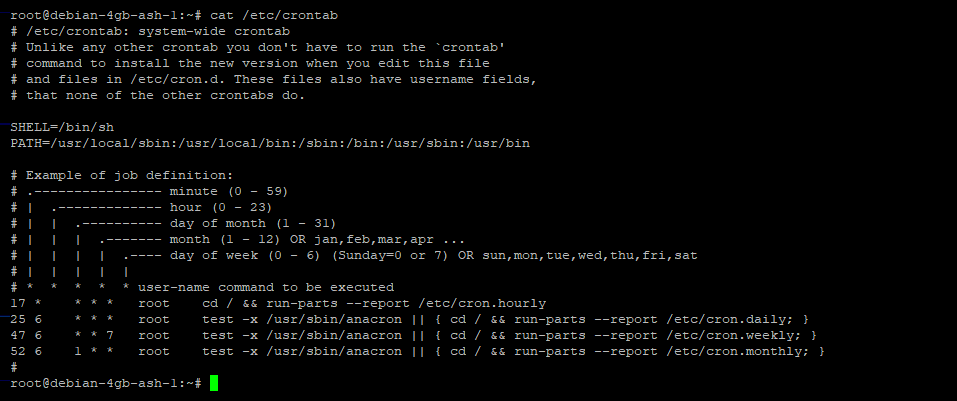
This is the content of /etc/crontab on an Ubuntu server:
Cron runs jobs in a minimal, non-interactive environment. This means it does not load the user’s shell configuration files (such as .bashrc or .profile) and provides only a limited set of environment variables. As a result, commands that work in an interactive shell may fail in cron if they rely on environment variables, aliases, or relative paths. For this reason, cron jobs should always use absolute paths to commands and files, and explicitly define any required environment variables within the crontab or script.
Create your account, pick a subscription plan, and make your first API call instantly with your API key—simple as that!
Get started now