🚀 Experience the new and improved APIVoid! Check out what's new
WINDOWS APP
APIVoid Folder Mirror is a free, lightweight Windows tool that makes a destination folder an exact copy of a source folder. It copies new and changed files in parallel, removes files that no longer exist, and adds the safety layers a real backup needs: dry run preview, mass-delete protection, content verification, and file versioning.
Free · Windows 10 & 11 · No account required
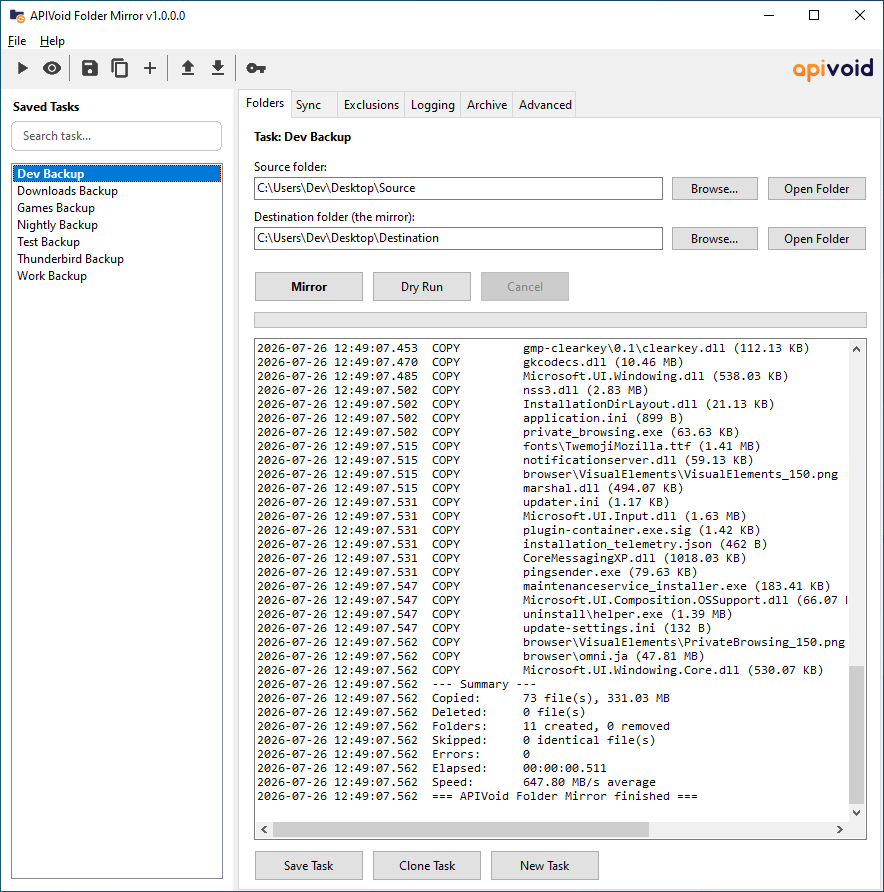
Fast & Safe Mirroring
APIVoid Folder Mirror scans source and destination in parallel, then copies only what changed and deletes only what no longer belongs. Multi-threaded workers, long-path support, and unbuffered copying for very large files keep it fast; layered safety checks keep your data safe.
Scanning, comparing, copying, and deleting all run on parallel workers (up to 64). A no-op re-run over thousands of files completes in a fraction of a second.
See every copy, delete, and folder operation the mirror would perform, in a full log, without changing a single file on disk. Review it, and if all is fine, click the Mirror button.
Refuses to run when the source is empty, warns before mass deletions at a threshold you choose, and can send deletions to the Recycle Bin.
Remembers which physical volume your destination lives on, so a shuffled USB drive letter can never silently receive (or lose) your backup.
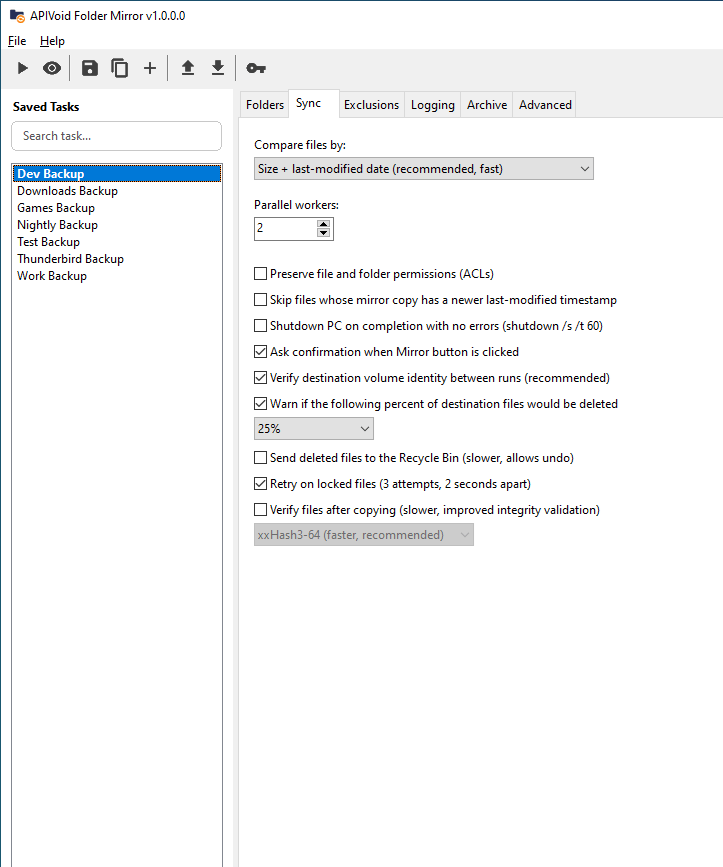
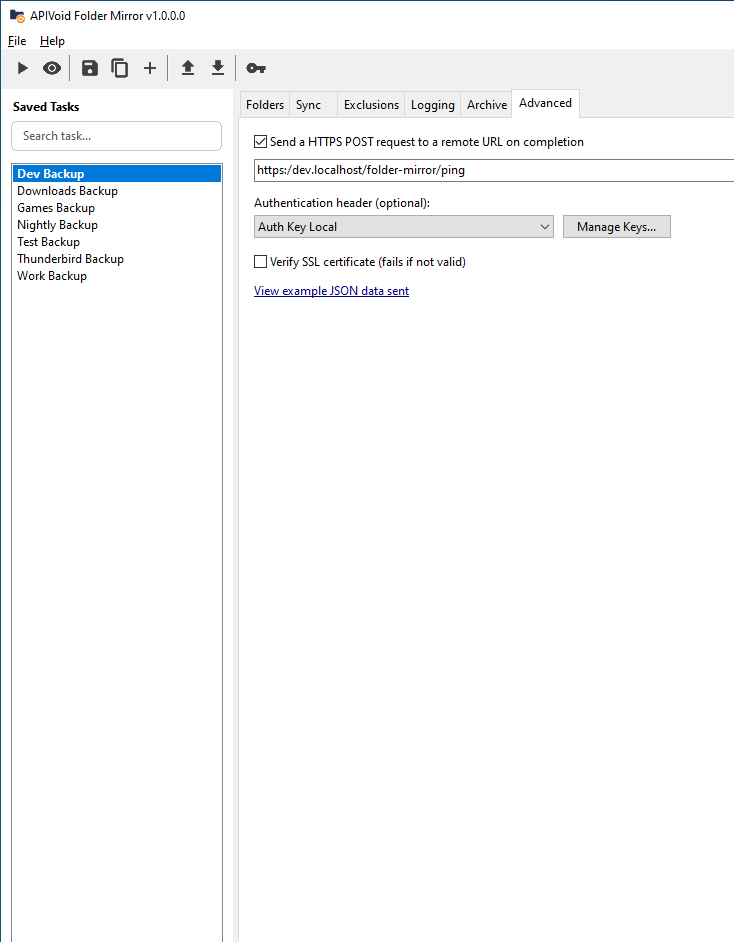
Saved Tasks & Automation
Every combination of folders and options can be saved as a named task: load it with a double-click, export it to a file, share it with a colleague, or migrate all your tasks to a new PC. Full command-line support turns any task into an unattended scheduled backup.
Run /task:"Nightly Backup" /run /close from Windows Task Scheduler. Exit codes report success, errors, or startup failures, and no dialog can ever block a scheduled run.
Export tasks to simple INI files, generate them from scripts, and run them with /task_file. Bulk export and import moves your whole task library between machines.
On completion, send an HTTPS POST with full JSON results (files copied, deleted, verified, errors, speed, machine and task name) to your monitoring endpoint, with optional authentication headers.
Timestamped log files with selectable operation types (e.g. file deletion, overwrite, folder creation), plus an optional JSON Lines format that log platforms such as ELK and Splunk ingest natively.
Verification & Versioning
Beyond fast size-and-date comparison, the program can compare files byte-by-byte with zero collision risk, re-read every copied file and verify it with xxHash3, and archive deleted or overwritten files into dated folders so nothing is ever truly lost.
The strictest mode compares files byte-by-byte and stops at the first difference, providing an exact content comparison without relying on checksum matches.
Optionally re-read each copied file and verify it with xxHash3-64 or xxHash3-128. A corrupted copy is detected, logged, and removed so the next run repairs it.
Archive deleted and overwritten files into per-run dated folders, preserving the original structure. Same-volume archiving is an instant file move (super fast), not a copy.
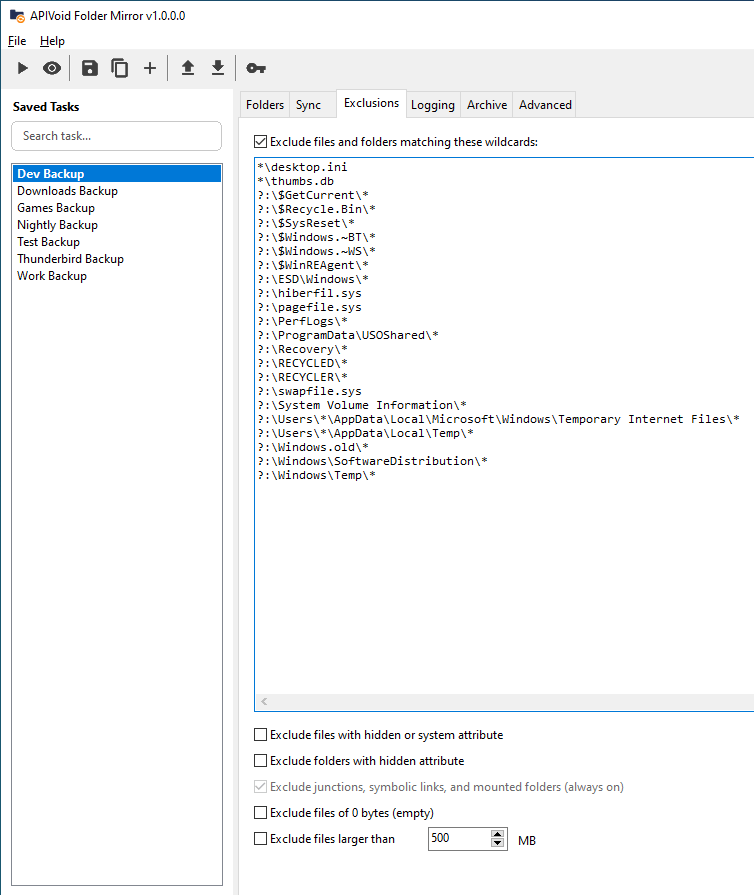
Wildcard patterns (with sensible Windows system defaults), hidden and system attributes, empty files, and size limits, applied to both sides like robocopy's /XF and /XD.
Copies new and changed files, deletes extras, creates and removes folders. The destination becomes an exact, browsable copy of the source, no proprietary backup format.
Files held open by other programs are retried automatically (3 attempts, 2 seconds apart), turning transient locks into successful copies instead of errors.
As extra safeguard, before touching anything the plan is checked against the destination's free space, accounting for the room that deletions and overwrites will free first.
Long paths beyond 260 characters, junction and symlink skipping, read-only attribute handling, optional ACL permission preservation, and automatic Alternate Data Stream copying.
Progress bar, live transfer speed and ETA in the title bar (visible from the taskbar), and a summary with elapsed time and average speed after every run.
Optionally shut down the PC (shutdown /s /t 60) after a successful run, perfect for end-of-day backups. Only triggers when the mirror completed with zero errors.
COMMON QUESTIONS
Clear answers about what APIVoid Folder Mirror does, common usage questions, and exactly how it mirrors the source folder.
APIVoid Folder Mirror is a free Windows application that keeps a destination folder as an exact copy of a source folder, similar to robocopy /MIR but with a graphical interface. It copies new and changed files using parallel workers, deletes files that no longer exist in the source, and adds safety features such as dry run previews, mass-delete warnings, content verification, and file versioning.
Yes, all of our Windows software is digitally signed by NoVirusThanks Company Srl. This includes the installer, uninstaller, and the program's executable files.
Yes, APIVoid Folder Mirror is free to download and use. It is a Windows application that runs on Windows 10 and Windows 11. No account, sign-up, or subscription is required to use it.
Mirroring makes the destination identical to the source: new and changed files are copied, and files that were deleted from the source are also deleted from the destination. The result is a plain, browsable copy of your source folder. No special software is needed to restore it, just copy the files back. Because deletions are part of mirroring, APIVoid Folder Mirror adds several protections, including an optional warning when a large percentage of the destination would be deleted, a refusal to run when the source is unexpectedly empty, optional Recycle Bin deletion, and optional archiving of every deleted or overwritten file.
Yes. Save your folders and options as a named task, then run it from Windows Task Scheduler with command-line parameters such as /task:"Nightly Backup" /run /close. In this mode no dialogs are ever shown, so a scheduled run can never hang waiting for a click, and the process exit code reports the result: 0 for success, 1 for completed with errors, and 2 when the run could not start. Tasks can also be loaded from INI files with /task_file, which is useful for script-generated configurations. A Command-line.txt reference is installed with the program, or click on the main menu Help -> Command-line.
Two independent mechanisms are available. The "Exact content" comparison mode compares source and destination files byte-by-byte, with zero collision risk and early exit at the first difference. Separately, the optional "Verify files after copying" feature re-reads every copied file and compares xxHash3-64 or xxHash3-128 digests of the source and the new copy; the hash of each verified file is written to the log, and if verification fails the corrupted copy is deleted so the next run replaces it. This catches corruption caused by faulty cables, failing drives, or unreliable USB enclosures at backup time instead of at restore time.
By default they are removed or replaced, as mirroring requires. You can optionally send deletions to the Recycle Bin for easy undo, or enable the Archive feature, which moves every deleted file and every previous version of an overwritten file into a dated folder (one per run) that preserves the original folder structure. When the archive folder is on the same drive as the destination, archiving is an instant move rather than a copy, so it adds virtually no time to the run.
Yes. Both mapped network drives (such as Z:\Backups) and UNC paths (such as \\NAS\Backups or \\192.168.1.50\Backups) are fully supported as source or destination, including paths longer than 260 characters. For scheduled runs with Windows Task Scheduler, use the UNC path rather than a mapped drive letter: drive mappings belong to your interactive logon session and typically do not exist when a scheduled task runs in the background, while UNC paths work in any session. A few options behave differently on network shares: the destination volume identity check is skipped (the UNC path already names the server explicitly), the Recycle Bin option deletes permanently because network locations have no Recycle Bin (use the Archive feature instead if you want to keep replaced files), and ACL permission preservation requires a share that supports Windows ACLs, so it is best left disabled for Linux-based NAS devices.
Yes. Windows assigns drive letters on a first-come basis, so the letter E: can point to a different disk than it did yesterday. APIVoid Folder Mirror records the volume name and serial number of the destination after each successful run, and checks them before the next run of the same destination path. If the volume changed, an interactive run shows a clear warning with both identities, and a scheduled command-line run refuses to start. The destination's volume name and serial are also written to the log of every run.
Yes. The Advanced tab lets you configure an HTTPS webhook: when a run finishes (including runs that end with errors), APIVoid Folder Mirror sends a POST request with a JSON payload containing the status, task name, computer name, device model, user, source and destination, elapsed time, average speed, and full counters for copied, deleted, skipped, verified, and archived files. Requests can carry a custom authentication header (for example X-API-Key) managed through the built-in Auth Key Manager, where secret values are stored encrypted with Windows DPAPI. Self-signed certificates can be accepted by disabling certificate verification, and the request times out after 15 seconds.
No. All mirroring, comparison, verification, and archiving happens locally on your computer. Your files are never uploaded anywhere, and no telemetry is collected or transmitted. The only network request the program can make is the optional completion webhook, which you configure yourself, points to your own endpoint, and contains only run statistics and machine identification, never file contents.
No. In the current version, the program does not automatically check for, download, or install updates. To update to a newer version, you will need to manually download and run the latest setup file, which will overwrite the currently installed version on your system.
It is built for anyone who wants reliable, transparent folder backups on Windows: home users mirroring photos and documents to an external drive, developers keeping important project folders synchronized, and system administrators scheduling unattended nightly mirrors with webhook monitoring. If you like the simplicity of robocopy /MIR but want a GUI, saved tasks, fast file operations, verification, versioning, and safety rails, APIVoid Folder Mirror brings all of that together in one practical tool.
Create your account, activate your free trial and make your first API call. No credit card and no commitment required.
Get started now