🚀 Experience the new and improved APIVoid! Check out what's new
WINDOWS APP
APIVoid Notepad is a free, lightweight tabbed text editor for Windows with syntax highlighting. It goes beyond plain editing with built-in CSV tools, extraction of URLs, IPs and hashes, file hashing, and a whole toolbox of utilities for security analysts, developers, and power users.
Free · Windows 10 & 11 · No account required
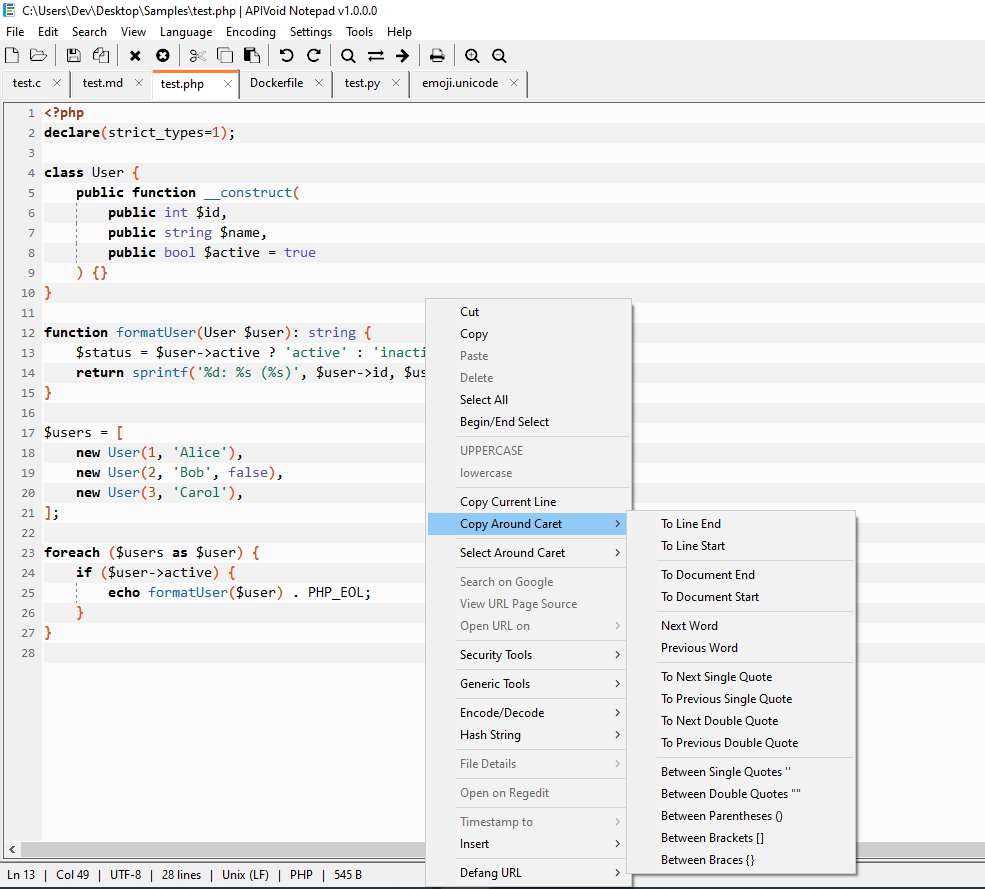
Powerful Editing
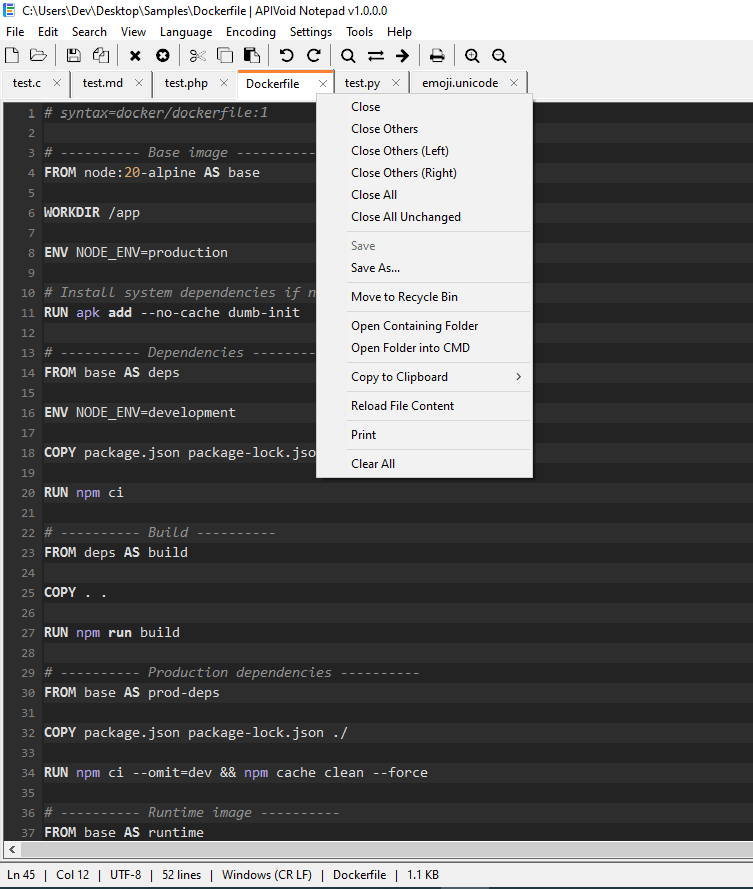
Open as many files as you need in a clean tabbed interface. APIVoid Notepad highlights over forty languages out of the box, organized into categories, and handles large and binary files efficiently.
Work with multiple documents in one window. Reorder tabs by dragging, close with middle-click, and see the full file path on hover.
Syntax highlighting for languages from Python, C/C++, and Go to TOML, Dockerfile, PowerShell, and Registry files, grouped by category.
Large logs (1GB+) and binary files are handled accurately. The editor may hang with very large files, just wait and don't close it.
Detects and converts between ANSI, UTF-8, UTF-16, and line-ending styles, with the current encoding shown in the status bar.
Extract Operations
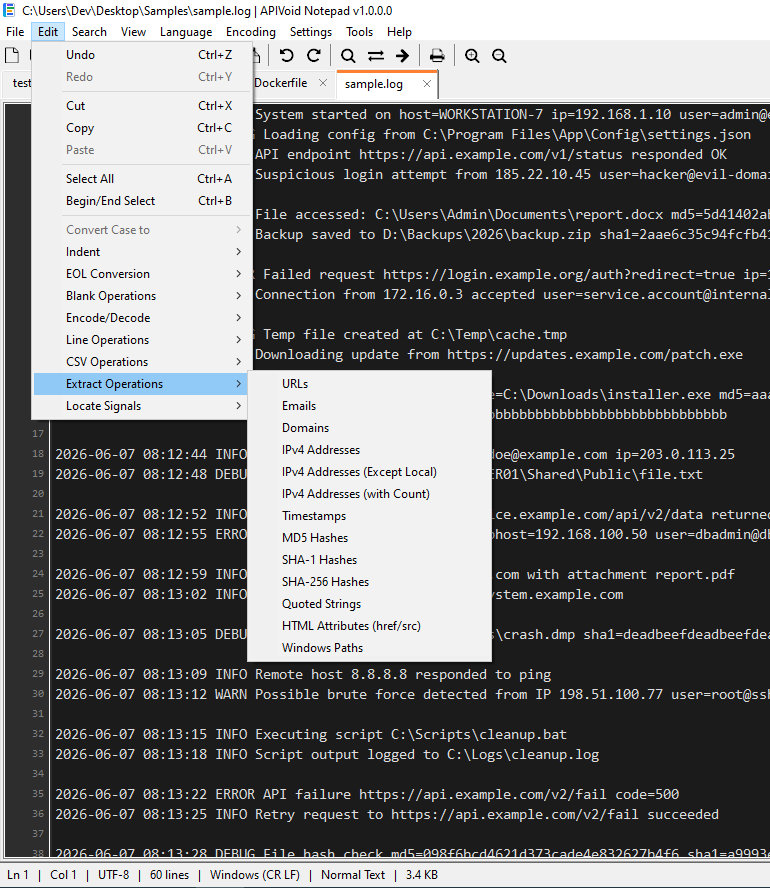
Stop writing one-off regex every time you need to extract indicators out of a log or report. APIVoid Notepad extracts URLs, emails, domains, IPv4 addresses, timestamps, and MD5/SHA hashes from the current document or selection (and it's fast even for large files).
Extract URLs, emails, domains, IPv4 addresses, MD5, SHA-1, and SHA-256 hashes, plus quoted strings, HTML attributes, and Windows paths.
Extract IPv4 addresses while automatically excluding loopback, private, and reserved ranges to focus on routable public IPs.
Scanning is built to be fast and shows a progress bar, and identical matches (duplicates) are collapsed so you get a clean, unique list.
Choose to send the extracted results straight to the clipboard (to paste elsewhere), or save them to a text file with a single click.
CSV Operations
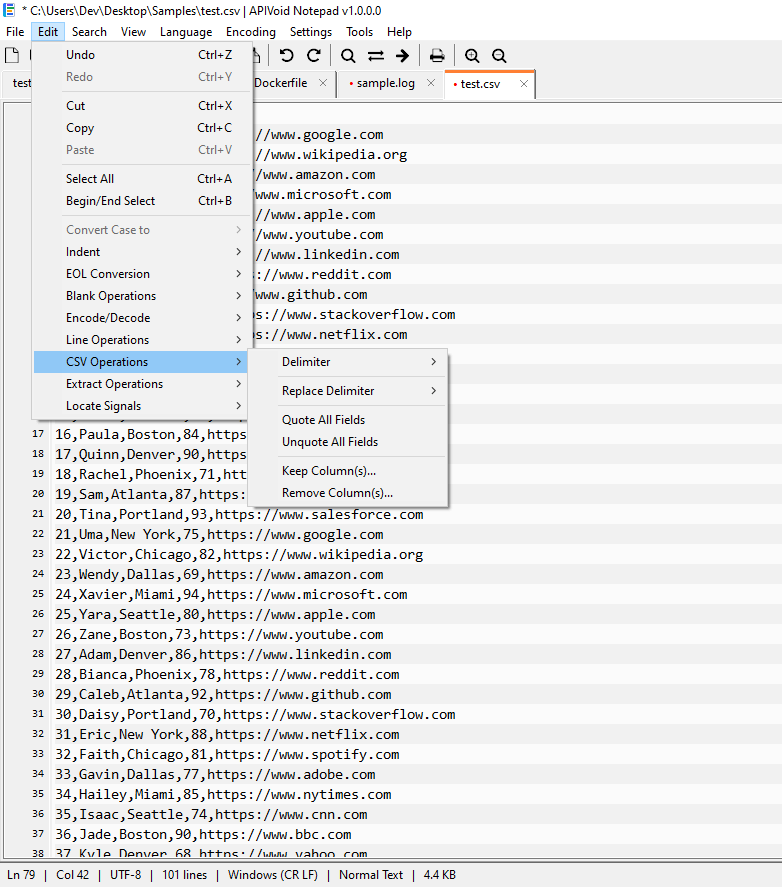
APIVoid Notepad includes a proper RFC 4180 CSV engine that respects quoting and embedded delimiters. Detect or set the delimiter per tab, replace it, quote or unquote fields, and keep or remove columns by number or range, all as single-click whole-document operations.
Auto-detect the delimiter or set comma, semicolon, tab, pipe, or a custom character. Replace the delimiter across the whole file at once.
Keep or remove columns using simple specs like 1, 1,3 or 1-4,6, with proper handling of quoted fields that contain common delimiters.
Quote every field for safe interchange, or non-destructively unquote fields that do not require quoting for improved readability and processing.
The built-in CSV parser understands RFC 4180 quoting, so commas and newlines inside quoted fields never corrupt your data.
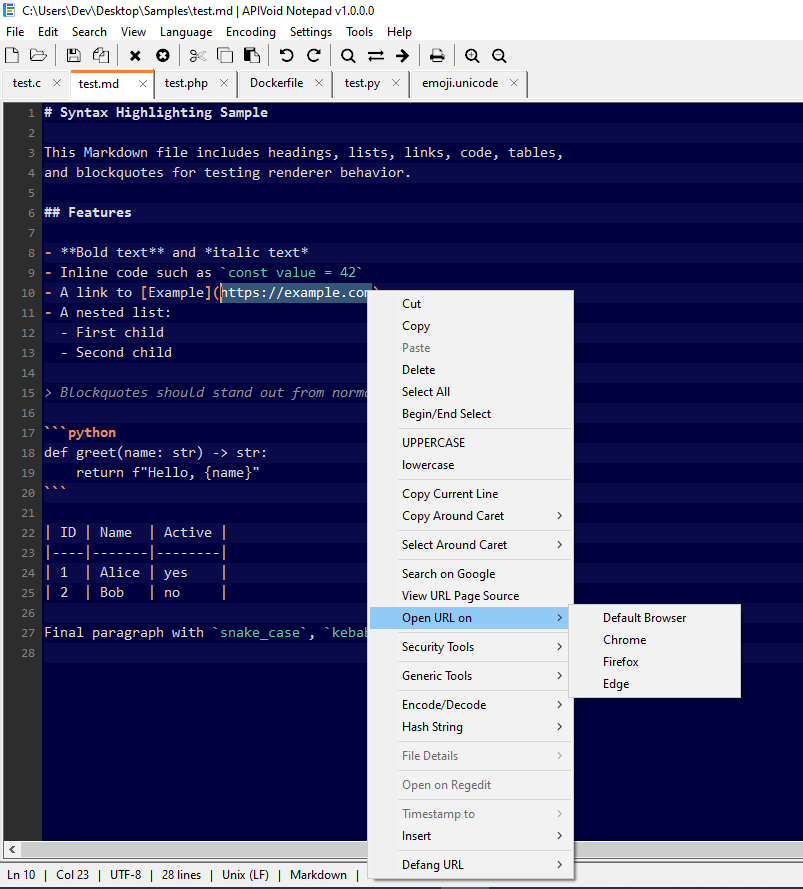
Right-Click Power Tools
Select any text, right-click, and act on it instantly, no copy-pasting into separate utilities. APIVoid Notepad packs encoding, hashing, timestamp conversion, and analysis actions directly into the editor's context menu, so you can transform data in-place.
Convert a selection to and from Base64, HTML entities, and URL encoding, or hash it as MD5, SHA-1, or SHA-256 on the spot.
Make a malicious URL safe to share (e.g. hxxps[://]bad[.]com) with one click, then refang it just as easily when you need the original URL back.
Select a Windows path to open its file properties, calculate its MD5 or SHA hash, or open its containing folder, straight from the menu.
Drop in a UUID, GUID (CLSID), timestamp, your public IP, computer details, or a file's version info and digital signer in seconds.
COMMON QUESTIONS
Clear answers about what APIVoid Notepad does, which platforms it supports, how the analysis tools work, and how it handles your data.
APIVoid Notepad is a fast, free tabbed text and code editor for Windows, and a great alternative to Windows Notepad. On top of fast editing and syntax highlighting for more than forty languages, it adds a toolbox aimed at developers and security analysts: extracting indicators such as URLs, IP addresses and hashes from text, CSV manipulation, line operations, log signal detection, file hashing, URL page source viewer, and many small utilities, all built directly into the editor's menus.
Yes, all of our Windows software is digitally signed by NoVirusThanks Company Srl. This includes the installer, uninstaller, Explorer shell extension DLL, and the program's executable files.
No. In the current version, the program does not automatically check for, download, or install updates. To update to a newer version, you will need to manually download and run the latest setup file, which will overwrite the currently installed version on your system.
Yes, APIVoid Notepad is free to download and use. It is a 32-bit and 64-bit Windows application that runs on Windows 10 and Windows 11. No account, sign-up, or subscription is required to use it.
Extract Operations scans the current document, or just your selection, and pulls out URLs, email addresses, domains, IPv4 addresses (with an option to exclude private and reserved ranges), timestamps, MD5, SHA-1 and SHA-256 hashes, quoted strings, HTML href/src attributes, and Windows file paths.
Locate Signals scans a log file for meaningful events grouped into categories such as system errors, resource issues, failed authentications, network failures, and application crashes. You can run a single category or all of them at once. Matches appear in a docked results panel with their line numbers, and clicking a result moves the editor caret directly to that line so you can review the surrounding context.
Yes. APIVoid Notepad uses an RFC 4180-compliant CSV engine, so delimiters and newlines inside quoted fields are handled correctly and never split your data incorrectly. You can auto-detect or set the delimiter per tab (comma, semicolon, tab, pipe, or a custom character), replace the delimiter across the whole file, quote or unquote all fields, and keep or remove columns using ranges like 1-4,6. All operations apply to the whole document and can be undone with a single Ctrl+Z.
APIVoid Notepad highlights more than forty languages and formats, organized into categories in the Language menu. These include programming languages such as C#, C/C++, Go, Java, Kotlin, Python, Rust, and Swift; web languages like HTML, CSS, JavaScript, JSON, PHP, and TypeScript; scripting such as Bash, Batch, and PowerShell; data and configuration formats like INI, TOML, YAML, SQL, ENV, and Registry files; markup such as Markdown and LaTeX; and infrastructure formats including Dockerfile and HCL. The language is detected automatically from the file, and you can change it at any time from the menu.
APIVoid Notepad includes a file hash calculator (MD5, SHA-1, SHA-256, SHA-512), the ability to hash a selected string instantly, extract and insert a Windows executable's digital signer (publisher) and its version information such as product name, version, and company. You can also defang and refang URLs for safe sharing, encode and decode Base64, HTML, and URL text, retrieve your public IP address, open a selected URL, and right-click a file path in any document to open its properties, calculate its hash, or open its containing folder. It provides a rich right-click menu with all the options you may need.
No. APIVoid Notepad is a desktop application and all editing and analysis happens locally on your computer. Your files and text are never uploaded. The only features that make a network request are the optional ones you explicitly trigger, namely looking up your public IP address and viewing a URL's page source, which connect only to the specific endpoint required for that action. Everything else, including extraction, CSV operations, hashing, and log triage, runs entirely offline.
Yes. The program supports opening of large text files such as 1GB+ wuthout problems, and binary files are handled efficiently. The heavier analysis features, such as Extract Operations, Find / Replace, Lines Operations and Locate Signals, are also very fast and efficient also on large files. Please note that with large files the UI may occasionally freeze during specific operations, that is normal (don't close it).
It is built for anyone who works with text and data on Windows, but it is especially useful for security analysts, threat researchers, system administrators, and developers. If you frequently pull indicators out of logs, sort and clean lists of IPs, inspect CSV exports, check file hashes and signatures, or triage large log files, APIVoid Notepad brings those tasks together in one fast editor.
Create your account, activate your free trial and make your first API call. No credit card and no commitment required.
Get started now