🚀 Experience the new and improved APIVoid! Check out what's new
WINDOWS APP
APIVoid SFTP Terminal is a fast Windows client for SSH, SFTP, FTP/FTPS, WebDAV and Amazon S3. Manage tabbed sessions in a dual-panel interface, use split-view SSH terminals with broadcast mode, configure SSH keys, jump hosts and proxies, and protect credentials with Windows DPAPI and an optional master password.
Free · Windows 10 & 11 · No account required
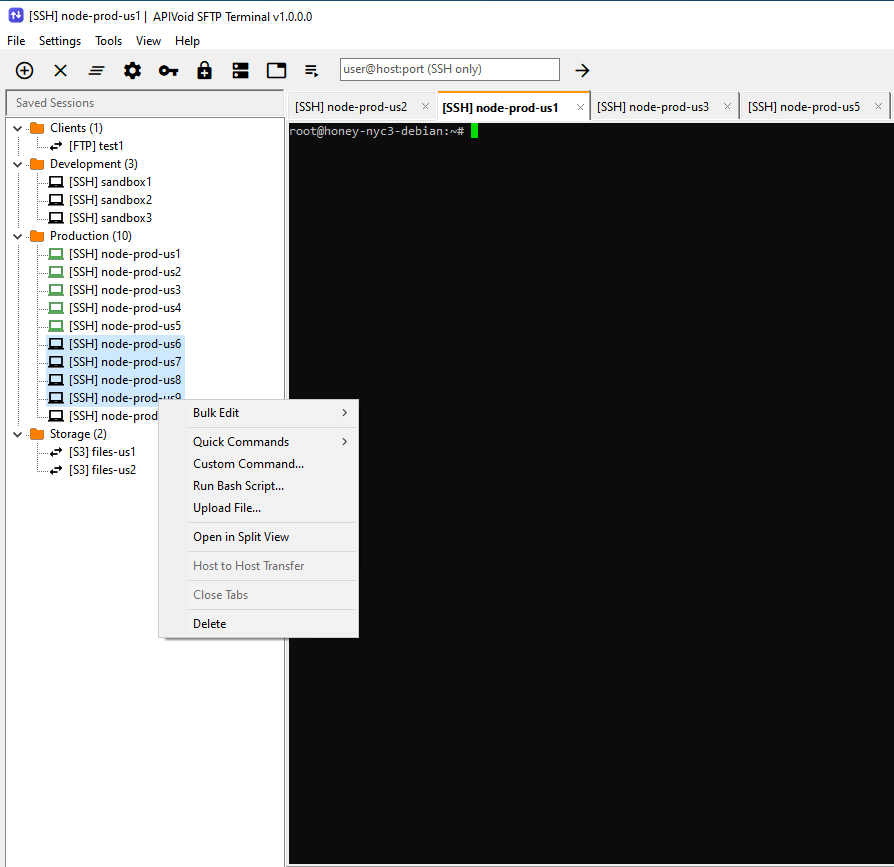
One Client, Every Protocol
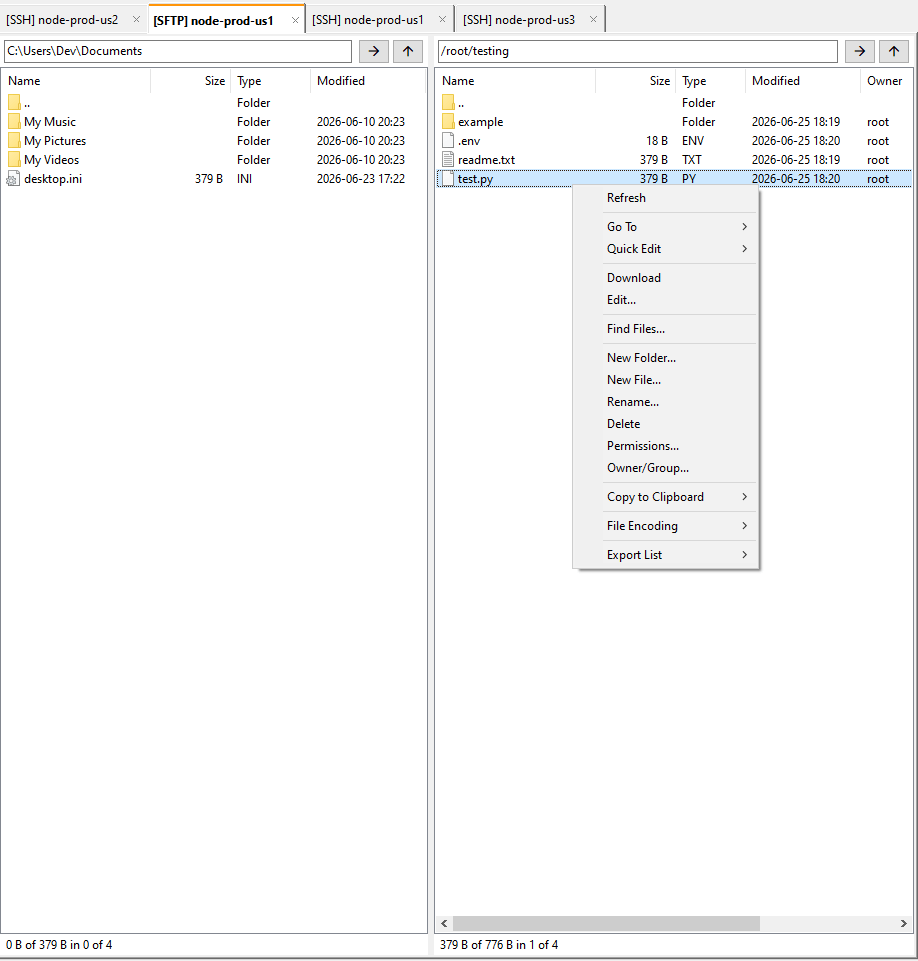
APIVoid SFTP Terminal connects to SSH/SFTP servers, FTP and FTPS, WebDAV shares, and Amazon S3 (and S3-compatible storage like MinIO or DigitalOcean Spaces) from a single window. Local files on the left, remote on the right, with drag & drop transfers between them.
Upload, download, rename and delete with drag & drop between panels. Download remote folders recursively and edit remote text files in place.
SFTP over SSH, plain FTP, implicit and explicit FTPS, WebDAV over HTTP/HTTPS, and Amazon S3 with AWS Signature V4.
Open as many servers as you need in reorderable tabs. Each tab is a fully independent connection with its own panels, sorting and menus.
Edit a file on the remote panel with the built-in Text Editor, with "Convert to Unix (LF)" option (no more dos2unix). It works also on the SSH terminal!
Smart Key Features
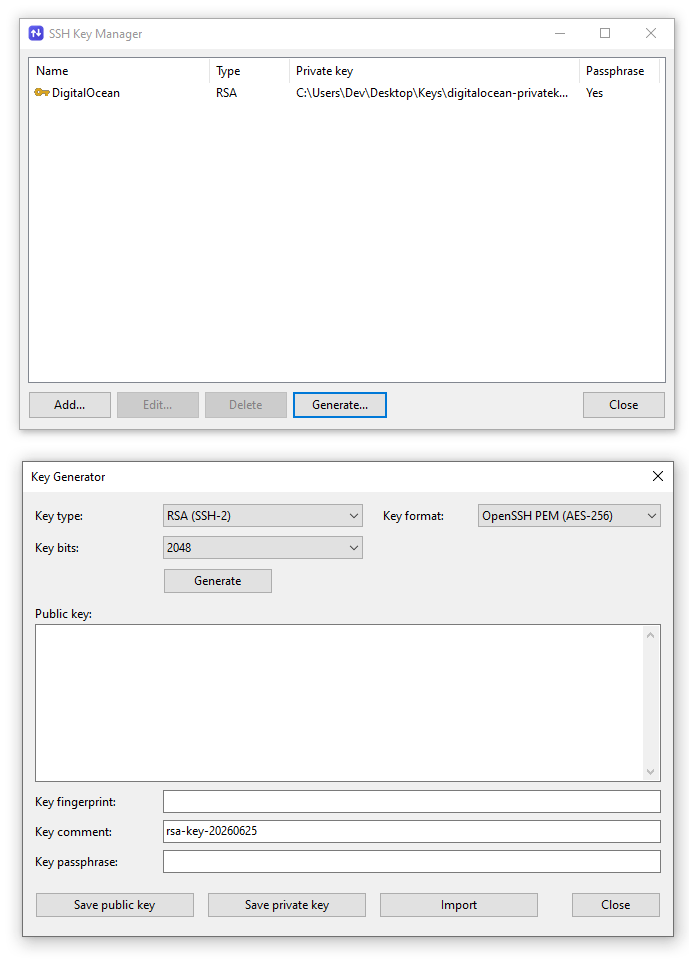
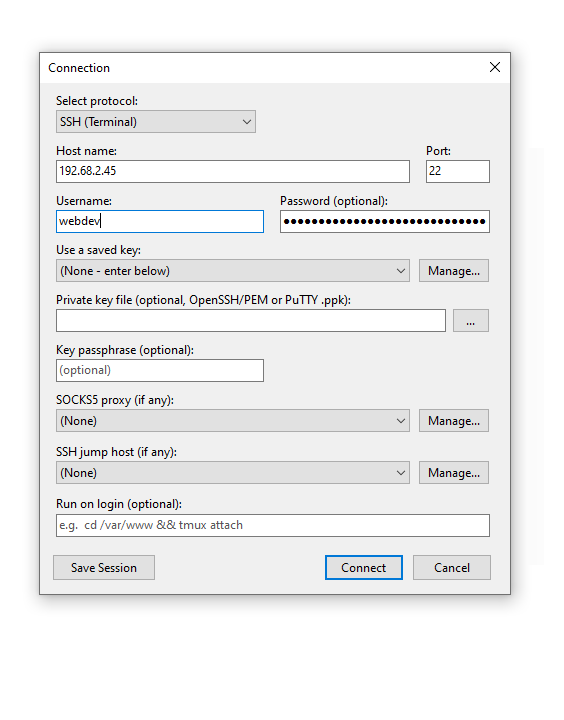
Authenticate with a password or with a private key. The SSH Key Manager lets you save named keys once and reference them from any connection, so you never paste a key path again, and key passphrases are sealed in the same encrypted vault as your other secrets.
Store named private keys (file path plus optional passphrase) and attach them to connections by reference. The passphrase is shown masked and never displayed in plaintext.
Create new RSA keys right inside the application via a simple Key Generator tool, save as standard PEM and optionally encrypted with a passphrase (AES-256-CBC).
Load PuTTY keys directly. The program converts .ppk format 2 and 3 (RSA, ed25519, ECDSA) in memory, including Argon2-protected v3 keys, with no external tools.
Reach servers behind a bastion with single-hop SSH jump hosts, or route connections through a managed SOCKS5 proxy, all selected per connection.
Terminal & Automation
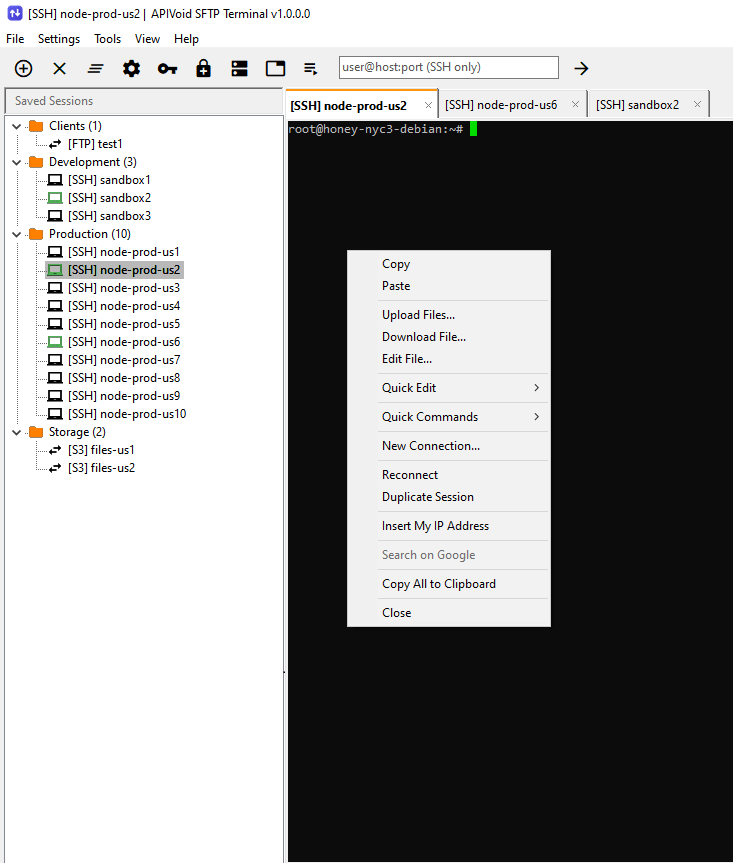
APIVoid SFTP Terminal is more than a file manager. It ships a real PuTTY-style SSH terminal with ANSI/VT100 colours, opens many shells side by side in a tiled split view, and can run a single command across dozens of servers in parallel, no separate terminal app required.
A character-grid terminal with full ANSI/VT100 parsing, colours, the alternate-screen buffer for tools like top and vim. You can also increase font size and change colors.
Tile multiple interactive terminals within a single window. Optionally enable Broadcast Mode to send commands to all panes simultaneously in real time.
Run a command across multiple SSH servers simultaneously, with per-server status indicators, error reporting, and live output.
Upload one or multiple files directly on the SSH terminal (drag&drop). You can also download files or edit them with the built-in Text Editor.
Security Built In
Every saved secret, server passwords, key passphrases, S3 secret keys and proxy credentials, is encrypted with Windows DPAPI and bound to your user account. Turn on the optional master password to add a second layer of strong, modern cryptography on top.
Secrets are protected with Windows DPAPI plus app-specific entropy, so the encrypted blobs are tied to your account on your machine and stored, never as plaintext.
An optional master password derives a key with Argon2id and seals each secret with AES-256-GCM. The password itself is never stored, and cannot be recovered!
While unlocked, the derived key remains encrypted in RAM and is decrypted only when needed. It can also be configured to automatically lock again after a period of inactivity.
Move your sessions to another PC with a passphrase-encrypted container (Argon2id + AES-256-GCM). Nothing password-derived is stored and tampering is detected.
VIDEO TUTORIAL
Here is a quick video showcasing the key features of the program. We'll connect to a few servers via SSH and SFTP to demonstrate how to use the program.

COMMON QUESTIONS
Clear answers about what APIVoid SFTP Terminal does, which protocols it supports, and exactly how it stores your passwords and secrets.
APIVoid SFTP Terminal is a fast, modern file transfer client and terminal for Windows. From a single dual-panel window it connects over SFTP (SSH), FTP and FTPS, WebDAV, and Amazon S3 (including S3-compatible storage such as MinIO and DigitalOcean Spaces). On top of file management it adds a built-in SSH terminal with split view, smart SSH key management, jump hosts and SOCKS5 proxies, fleet-wide Quick Commands, and strong encryption for all of your saved credentials.
APIVoid SFTP Terminal supports SFTP over SSH, plain FTP, implicit and explicit FTPS, WebDAV over HTTP and HTTPS, and Amazon S3 (signed with AWS Signature Version 4, using both path-style and virtual-hosted addressing for broad compatibility with S3-compatible providers). It also includes a full interactive SSH terminal with a rich right-click menu. Additionally, you can keep several connections open at once in separate tabs, each with its own independent session.
Yes. Import saved sessions from FileZilla, WinSCP, PuTTY, MobaXterm, and several other supported applications by selecting File → Migrate From..., choosing the sessions to import, and clicking Import Selected. For security reasons, passwords and other secrets cannot be imported.
All secrets, server passwords, SSH key passphrases, S3 secret keys and proxy passwords, are always encrypted before they are saved; they are never written in plaintext. By default APIVoid SFTP Terminal uses Windows DPAPI (CryptProtectData) with an application-specific entropy value, so each encrypted value is bound to your Windows user account on that specific machine and cannot be read by another user, another machine, or other DPAPI-using software. If you also enable the optional master password, every secret is additionally sealed with AES-256-GCM under a key derived from your master password with Argon2id before the DPAPI layer is applied, giving two independent layers of protection.
The master password is an optional second layer of protection over your stored secrets. When you set one, APIVoid SFTP Terminal derives an encryption key from it with Argon2id and stores only a verifier, never the password itself, so the password cannot be recovered from your machine. You are prompted to unlock on demand when needed, the derived key is kept encrypted in memory and decrypted only for the instant a secret is used, and the vault auto-locks after a configurable period of inactivity. Because nothing password-derived is stored in a recoverable form, if you forget the master password the protected secrets cannot be decrypted, you would need to re-enter them. Keep a safe backup of your master password.
You can authenticate with a password, a private key, or both. Private keys in OpenSSH and PEM formats are supported, and PuTTY .ppk files are also supported. The built-in SSH Key Manager lets you save named keys once and reference them from any connection, and the key generator can create new RSA, ECDSA and Ed25519 keys, written as standard PEM and optionally encrypted with a passphrase. Key passphrases are protected in the same encrypted vault as your other secrets.
Yes. APIVoid SFTP Terminal can reach servers behind a bastion using single-hop SSH jump hosts: it authenticates the bastion with any supported method, opens a direct channel to the real target, and tunnels your session through it transparently. Alternatively, connections can be routed through a managed SOCKS5 proxy, where the target host name is resolved at the proxy. Jump hosts and proxies are managed centrally and selected per connection, and their credentials are encrypted just like your session secrets.
Yes. Alongside the interactive PuTTY-style SSH terminal (with ANSI/VT100 colours and support for full-screen tools like top and vim), Split View tiles several live terminals in one window, with the optional broadcast mode to send keystrokes to all servers. The Quick Commands feature runs a single command across a whole set of SSH servers in parallel, showing a per-server status list and the selected server's output side by side, and the Task Runner handles batch jobs across not-saved-sessions servers.
Yes, through the encrypted Import / Export feature. Because secrets are bound to your Windows account with DPAPI, they cannot simply be copied between machines, so APIVoid SFTP Terminal exports your preferences and saved sessions into a passphrase-protected container encrypted with AES-256-GCM and a key derived using Argon2id. Nothing password-derived is stored in the file, and any tampering with it is detected on import. On the new machine the container is decrypted with your passphrase and the secrets are re-encrypted with that computer's local DPAPI. The decrypted data only ever exists in memory.
No. APIVoid SFTP Terminal connects only to the servers you configure, using the protocol and port you choose. Your files are transferred directly between your computer and your servers, and your saved credentials never leave your machine, they are stored locally and encrypted as described above. There is no APIVoid account, telemetry, or cloud relay involved in making your connections.
Yes. When you connect to a server whose certificate is self-signed (or otherwise unknown), the program shows you the certificate details and its fingerprint, and you decide whether to trust it. Your choice is remembered for future connections. The same applies to FTPS servers.
One note for S3 with a self-signed certificate: in the current version, establishing the connection can take up to 20–30 seconds and the program may appear unresponsive during that time. This happens because the program uses SChannel, the secure connection layer built into Microsoft Windows, and Windows performs its own additional checks on unknown certificates. Using a certificate from a recognized authority (for example a free Let's Encrypt certificate) removes both the delay and the trust prompt entirely.
APIVoid SFTP Terminal uses the same "trust on first use" model that SSH has relied on for decades. The first time you connect to an FTPS or WebDAV server, the program shows you the server's certificate details and unique fingerprint, and asks you to confirm. Once accepted, the fingerprint is stored securely on your computer, and every future connection silently verifies that the server still presents the same certificate. If the certificate ever changes unexpectedly, you are warned before any credentials are sent, which protects you against tampering and man-in-the-middle (MITM) attacks.
For Amazon S3 and S3-compatible services (such as DigitalOcean Spaces and MinIO S3), the program additionally uses the certificate validation built into Windows: certificates issued by a recognized authority are verified automatically, and the trust prompt only appears for certificates Windows cannot verify on its own, such as self-signed ones. This design is intentional: it works equally well with public cloud providers and with private, self-hosted servers that have no publicly issued certificate.
Yes, all of our Windows software is digitally signed by NoVirusThanks Company Srl. This includes the installer, uninstaller, and the program's executable files.
No. In the current version, the program does not automatically download or install updates. To update to a newer program version, you will need to manually download and run the latest setup file, which will overwrite the currently installed version on your system.
Yes, APIVoid SFTP Terminal is free to download and use. It is a 32-bit and 64-bit Windows application that runs on Windows 10 and Windows 11. No account, sign-up, or subscription is required to use it.
It is built for anyone who manages remote servers and storage on Windows, but it is especially useful for system administrators, DevOps engineers, web developers, and security professionals. If you regularly move files over SFTP or FTP, manage WebDAV shares or S3 buckets, work in SSH terminals, run commands across a fleet of servers, or need to keep many credentials organised and encrypted, APIVoid SFTP Terminal brings those tasks together in one simple and powerful client.
Create your account, activate your free trial and make your first API call. No credit card and no commitment required.
Get started now